Baby Distractor: Finger Paint
Jalapeño Mobile AppsRating 3.6
Editor's summary
Editor rating

 3.6
3.6
One-line summary Baby Distractor: Finger Paint is easy to hand to a toddler for instant, low-friction screen play, but its simplicity also means older kids and parents looking for depth will run out of reasons to come back fairly quickly.
-
Installs
1M+
-
Developer
Jalapeño Mobile Apps
-
Category
—
-
Content Rating
Everyone
-
Latest version
3.1.2
-
Package
se.adopi.android.fingerpaint
Screenshots
In-depth review
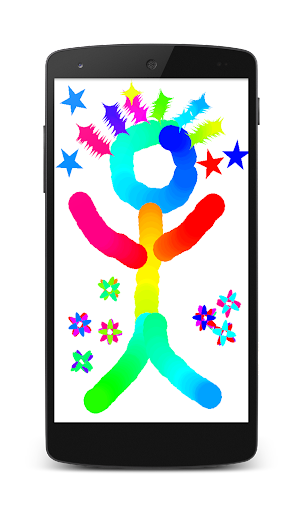
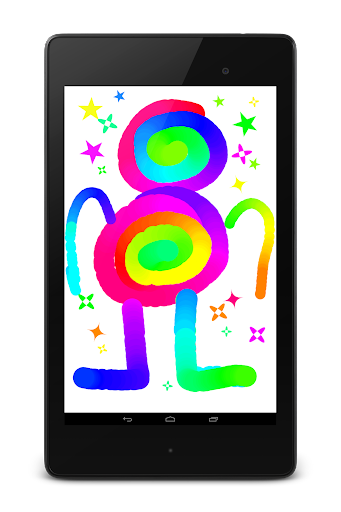
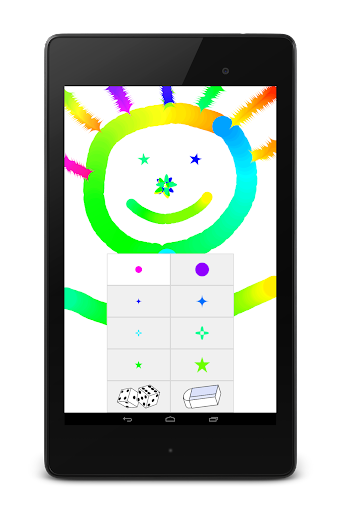
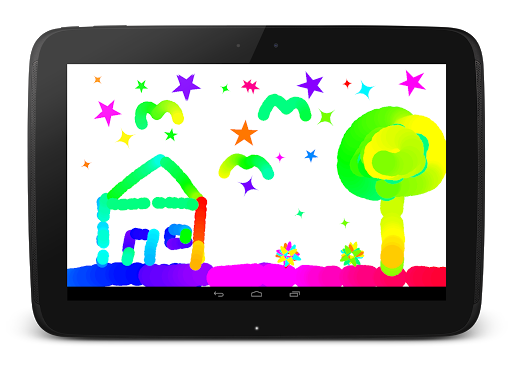
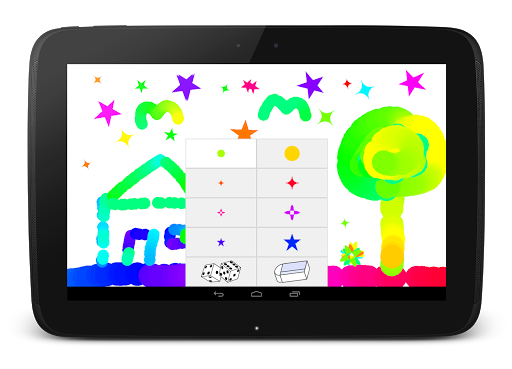
Baby Distractor: Finger Paint is the kind of app you install for a very specific moment: you need something bright, immediate, and safe-feeling to occupy a very young child for a few minutes, and you do not want to explain rules, menus, or goals. Used in that context, it makes a solid first impression. We opened it expecting a basic finger-painting toy, and that is essentially what it delivers. Touch the screen, move a finger, and something happens right away. For an app aimed at babies and toddlers, that instant cause-and-effect matters more than fancy features, and this app understands that better than many children’s apps that bury simple play under too many buttons and options.
In practice, the best thing about Baby Distractor: Finger Paint is how low the barrier to entry feels. There is no learning curve worth speaking of. A child can start making marks almost immediately, and the interaction is direct enough that even very young kids can understand what the app wants from them. As a reviewer, that simplicity was one of the app’s biggest strengths. It does not ask for reading skills, planning, or patience. It gives the child a digital space to tap, smear, and scribble, and for the intended age group, that can be enough.
The second thing that stood out during use was how well the app fits short attention spans. This is not a sit-down creative suite for building elaborate artwork. It is closer to a visual distraction toy with painting as the hook. That may sound limiting, but it is also why it works. In our testing, it felt most useful in those in-between moments: waiting rooms, a few minutes in the car before leaving, or while a parent needs a brief breather. Because the interaction is so immediate, the app does not waste the child’s attention on setup. For parents, that convenience is real.
A third strength is that the concept itself is age-appropriate. Plenty of kids’ apps claim to be toddler-friendly while loading the screen with clutter. Baby Distractor: Finger Paint feels more focused than that. It understands that babies and younger toddlers respond well to bright visual feedback and touch-driven play. In use, that makes the app approachable rather than overwhelming. There is value in software that knows what it is trying to be.
That said, the same simplicity that makes the app accessible also becomes its biggest weakness after the first several sessions. As adults reviewing it through actual repeated use, we found the experience thin. There is only so much you can say about finger painting on a screen before the lack of variety starts to show. If your child is the kind who enjoys repetition, that may not matter much. But for slightly older toddlers or preschoolers with longer attention spans, the app can start to feel one-note. It works best as a quick distraction, not as a lasting creative destination.
The second issue is that the app’s appeal is heavily age-dependent. For babies and very young toddlers, the simple interaction is a benefit. For older kids, it can feel underpowered almost instantly. We would not recommend this as a general children’s drawing app for families hoping one install will cover a wide age range. It is more narrowly targeted than the title suggests. If your child wants tools, choices, playful surprises, or any sense of progression, this app is probably too basic.
A third drawback is that the app does not leave much room for parent engagement beyond handing over the device. Some kids’ creative apps invite a bit of shared play, whether through funny reactions, richer drawing options, or enough variety to spark conversation. Here, the experience is more passive from a parent’s perspective. That is not always a flaw—sometimes a parent simply needs two quiet minutes—but it does limit how much staying power the app has in family use.
In day-to-day use, then, Baby Distractor: Finger Paint lands somewhere between useful tool and disposable toy. We appreciated its clarity of purpose. It does not pretend to be educational in a heavy-handed way, and it does not drown young children in complexity. When we approached it on its own terms, it was easy to understand why it has stuck around and attracted a large number of installs. It is simple, accessible, and ready instantly, which is often exactly what a parent needs in a child-focused app.
But we also felt the edges of that design pretty quickly. There is not much depth, not much evolution, and not much reason for older children to return once the novelty wears off. The app is at its best when treated as a digital fidget toy with paint-like interaction, not as a robust art app.
Who is it for? Very young children, especially babies and toddlers who enjoy tapping and smearing the screen and do not need structure or goals. It is also for parents who want a free, lightweight distraction app that can be launched without explanation. Who is it not for? Older kids, preschoolers seeking more creative control, or parents who want richer art features, stronger educational value, or longer-lasting engagement.
Overall, Baby Distractor: Finger Paint succeeds at the small job it sets for itself. It is simple, immediate, and easy for little hands to enjoy. At the same time, it is hard to ignore how quickly the experience runs out of steam. We would recommend it as a situational download for very young children, with the understanding that its usefulness comes from convenience and accessibility rather than depth.
Alternative apps
- Kids Doodle - Color & Draw
- Drawing for Kids! Learning Games for Toddlers
- Bimi Boo Coloring Games for Kids
Recommended Apps
-

911 Emergency Dispatcher
Supersonic Studios LTD4.4
-

Metro
Metro by T-Mobile4.7
-

Google Voice
Google LLC4.2
-

Move to iOS
Apple3.7
-

ColorNote Notepad Notes
notes4.9
-

スシロー
株式会社あきんどスシロー0.0
-

CamScanner - PDF Scanner App
CamSoft Information4.9
-

Public Storage
Public Storage Apps4.0
-

McDonald’s UK
McDonald's UK4.1
-

QR & Barcode Reader
TeaCapps4.6
-

Need for Speed™ No Limits
ELECTRONIC ARTS4.4
-

Maps, Navigation & Directions
Universal Nav4.1
-

Photo Recover Plus - Restore
AbCdE3.3
-

StarMaker: Sing Karaoke Songs
Skyline Interactive Inc4.3
-

Takealot – Online Shopping App
Takealot4.5
You May Like
- No suggestions yet.