Apps Games Articles
Video Downloader for Instagram
ETM Video Downloader
Rating 4.7star icon
Editor's summary
Editor rating
star icon star icon star icon star icon
half star icon
4.5

One-line summary I’d recommend it because it makes grabbing Instagram videos and stories feel fast and low-effort, but I’d hesitate if you have little patience for the ad-heavy, utility-app style that often comes with free downloaders.

  • Installs

    50M+

  • Developer

    ETM Video Downloader

  • Category

    Social

  • Content Rating

    Teen

  • Latest version

    2.4.1

  • Package

    instagram.video.downloader.story.saver

Screenshots
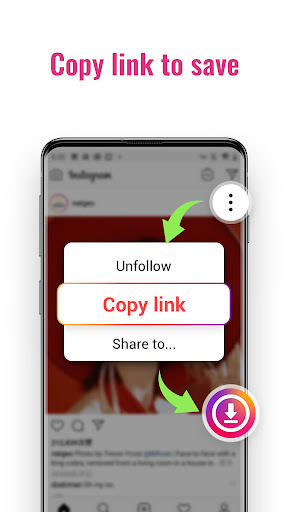
In-depth review
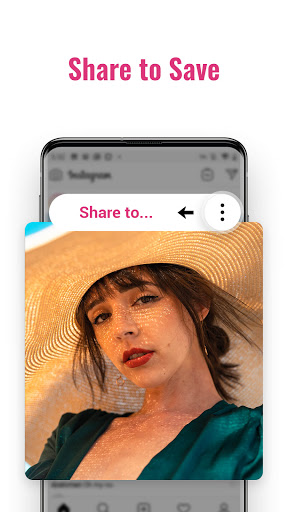
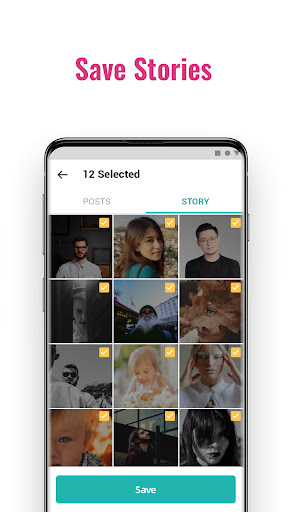
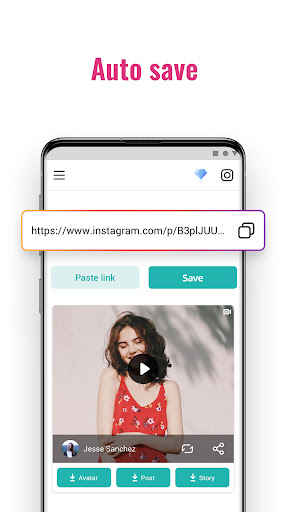
Video Downloader for Instagram is one of those apps that lives or dies by a simple question: when you see something on Instagram that you want to save, does it make that process quick, clear, and reliable enough that you stop thinking about the tool and just use it? After spending time with it in normal day-to-day use, that is mostly where this app succeeds. It does not try to be a social app, an editor, or a flashy all-in-one media suite. It feels like a utility, and in many ways that narrow focus works in its favor. The first thing that stood out during use was how little learning curve there is. Apps in this category can easily become cluttered with too many buttons, multiple save methods, and a lot of unclear prompts. Here, the experience feels more direct. The app’s main purpose is obvious from the moment you start using it, and the workflow feels built around the way people actually browse Instagram: see something interesting, copy or share the link, open the downloader, save it, move on. That sense of speed matters more than people think. If a downloader adds too many steps, most users simply stop bothering. This one generally stays on the right side of convenience. That ease of use is the app’s first big strength. We found that the overall interaction pattern feels familiar very quickly, even if you are not especially technical. It gives off the kind of practical, no-nonsense design that suits a downloader better than something overdesigned. The second strength is that it feels tuned for repeat use. Once you understand the flow, saving posts becomes routine. For people who frequently collect recipe clips, travel reels, fashion inspiration, or repost-worthy content for personal reference, that repeatability is exactly what makes an app worth keeping. A third strength is that the app feels like it knows what users came for. Many free utility apps bury the core action under banners, extra tabs, or unrelated “features” that distract from the main function. While this app still carries the usual free-app feel, the core task remains the center of the experience. In practical use, that makes it feel more efficient than many apps that aim to do too much. That said, this is not a perfect experience, and the rough edges are familiar ones for the category. The biggest weakness is that free downloader apps often come with a certain amount of interruption, and this one is unlikely to fully escape that. Even when an app works well, ads and pop-up-style prompts can chip away at the sense of smoothness. In a utility app, even a brief interruption feels larger than it would elsewhere because users are usually trying to complete a very short task. You open the app to save something and leave. Any friction is immediately noticeable. The second weakness is aesthetic and trust-related rather than purely functional. This kind of app often feels more utilitarian than polished, and Video Downloader for Instagram fits that mold. It gets the job done, but it does not always feel premium or especially refined. That does not mean it is hard to use; in fact, it is fairly straightforward. But there is a difference between “easy” and “elegant,” and this app leans more toward the former. If you are someone who expects crisp design, careful wording, and a highly polished Android experience, you may find it a little plain. The third weakness is that apps built around downloading from a single platform are inherently a bit narrow. If your needs are specific—saving Instagram videos, stories, or similar content for personal offline viewing—this is a practical tool. If you want a broader media manager, a serious editing workflow, cloud organization, or support for a wide range of platforms in one place, this will feel limited. Its value depends heavily on how often you actually save content from Instagram specifically. In everyday use, that defines the app more than anything else. It is best for people who regularly save Instagram content and want a dedicated shortcut instead of relying on screenshots, screen recordings, or awkward workarounds. Creators collecting references, casual users saving funny reels, and anyone who likes keeping offline copies of social clips will probably get along with it. It is also a good fit for users who prefer simple tools over feature-packed ones. It is not ideal for users who are sensitive to ads, want a highly polished visual experience, or need a broader content workflow beyond basic social-media saving. It is also not for people who only occasionally save one clip every few months; for them, installing a dedicated downloader may feel unnecessary. What keeps Video Downloader for Instagram on the recommended side is that the basics are handled well. The app appears to understand the rhythm of this job: open, paste or share, save, done. That sounds simple, but plenty of apps in this category fail by overcomplicating that exact sequence. Here, the convenience is real, and that is why the app’s high rating makes sense from a practical standpoint. It is not a beautiful app, and it may not be a perfectly frictionless one, but in our use it felt useful in the way a good utility should: reliable enough to become part of your routine. If your main goal is straightforward Instagram downloading without a lot of guesswork, this is an easy app to like. Just go in with the right expectations. You are getting a free, focused tool that prioritizes function over finesse—and for most people looking for exactly that, it does the job well.
Alternative apps