Apps Games Articles
Little Caesars
Little Caesar Enterprises, Inc.
Rating 4.7star icon
Editor's summary
Editor rating
star icon star icon star icon star icon
half star icon
4.5

One-line summary Little Caesars is one of the smoothest fast-food ordering apps I’ve used thanks to its fast pickup flow and clean checkout, but delivery markups and a few missing conveniences keep it from being an automatic must-download.

  • Installs

    10M+

  • Developer

    Little Caesar Enterprises, Inc.

  • Category

    Food

  • Content Rating

    Everyone

  • Latest version

    25.26.0

  • Package

    com.littlecaesars

Screenshots
In-depth review
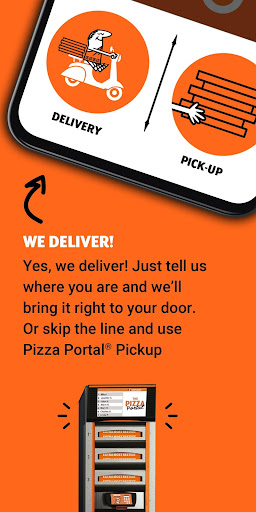
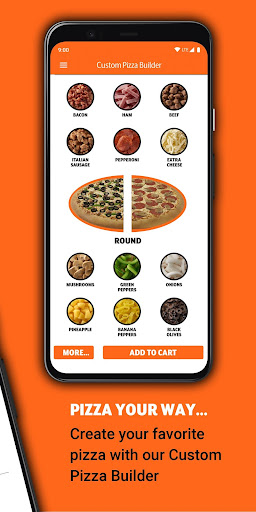
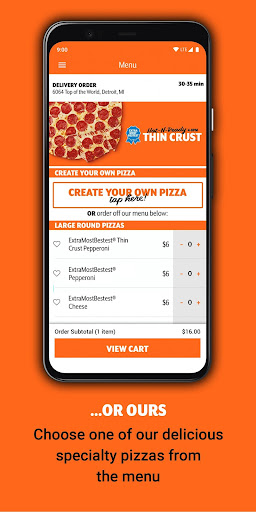
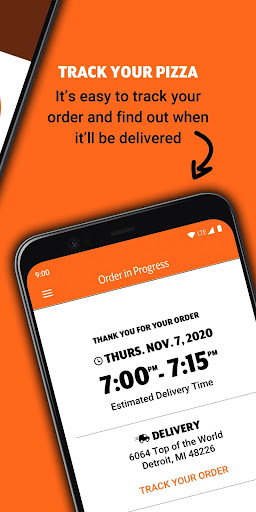
Little Caesars has a bold claim built into its branding: it wants to be the easiest way to get pizza. After spending real time with the app, I think that promise mostly holds up. This is one of those rare restaurant apps that feels designed around finishing a task quickly instead of trapping you in a maze of upsells, account prompts, and cluttered screens. If your goal is simple—pick a pizza, customize it, pay, and get on with your day—the app is remarkably good at staying out of your way. The first thing that stands out is how clean the ordering flow feels. The menu is easy to scan, prices are visible without digging, and customization is handled with less friction than I expected. Building an order does not feel like work. I was especially impressed by how straightforward the pizza customization process is, including options that make it easier to see what you’re doing as you add toppings. Even when putting together a more specific order, the app keeps the process understandable. That matters, because plenty of food apps turn a basic order into a sequence of small decisions spread across too many screens. Little Caesars keeps things moving. The second major strength is pickup. This is where the app feels genuinely different, not just competent. Ordering ahead and then walking in to retrieve the pizza through the Pizza Portal is the kind of feature that sounds gimmicky until you use it a few times. In practice, it is fast, practical, and excellent for anyone who values minimum social friction. On a busy evening, being able to skip the line, enter a code, and leave with your order makes the whole experience feel modern in a way many restaurant apps still don’t. For pickup users, this app is not just convenient; it can materially improve the entire Little Caesars experience. The third strength is payments and sign-in. The app supports streamlined payment methods like Google Pay, and that makes a big difference. Not having to type in card details every time turns a casual impulse order into a very low-effort process. On supported devices, biometric login adds another layer of convenience without making the app feel locked down. These are small quality-of-life touches, but together they make Little Caesars feel polished in daily use. That said, this is not a perfect app, and the weak spots become more noticeable once you move beyond the core pickup flow. The biggest drawback is delivery. Delivery is available, and it works, but it does not feel as elegant or as cost-friendly as pickup. There is an upcharge factor that makes delivery feel less appealing if you are price-sensitive, and the handoff to a third-party delivery experience can make the process feel slightly less cohesive than the app’s otherwise tidy design suggests. Tracking is available, which is helpful, but the delivery side never feels quite as seamless as the portal pickup side. If you are downloading this app primarily for delivery, you may still like it, but you are not getting the app at its absolute best. Another irritation is that some useful everyday features still feel absent or underdeveloped. Gift card handling is the clearest example. In a food ordering app, being able to apply every common payment method directly inside the app should be table stakes, and the lack of a smooth gift card option feels oddly old-fashioned for an app that gets so much else right. There are also areas where a little more real-time information would improve confidence, especially around readiness and availability. The app gives order status updates, which are useful, but there is still room for better live visibility into what is happening at the store level. My third complaint is more occasional than constant: the app can feel almost too optimized for speed, which means it sometimes leaves less room for flexibility than power users might want. It is fantastic for regular orders and quick repeats, but if you are the type who wants every edge case handled elegantly—every payment method, every store nuance, every status update integrated perfectly—you will notice a few rough edges. Also, while the app is generally stable and responsive now, restaurant apps as a category tend to be judged harshly when anything interrupts ordering, so even small hiccups stand out more here than they would in, say, a social app. Who is this app for? It is ideal for people who order pickup, want a fast and low-friction checkout, and appreciate a clear interface over flashy design. It is especially good for commuters, busy families, and anyone who likes ordering ahead and avoiding lines. It is also a strong fit for users who prefer contact-light pickup and simple reordering. Who is it not for? If you mostly rely on delivery and are very sensitive to extra fees, this app is less compelling. It is also not the best fit for someone who expects every payment option to be fully integrated or wants deeply detailed logistics inside the app itself. Overall, Little Caesars is one of the better food ordering apps on Android because it understands the real assignment: make ordering dinner feel easy. It succeeds through clarity, speed, and one genuinely excellent pickup system. The missing conveniences and less-than-perfect delivery experience hold it back from greatness, but for pickup orders in particular, this app is about as painless as fast-food ordering gets.